Learning objectives:
- …
- …
- …
- …
In this section, you will learn how to perform repeating actions using a concept called loops in programming. There are two types of loops, for and while loop, and we are going to explore both here.
Let’s create a variable called word and store the word “lead” which is a string:
word = "lead"
If we would like to print each character of the string, we have to use the println command for each element of the variable word:
println(word[1])
println(word[2])
println(word[3])
println(word[4])
However, this is a not a good practise because:
Here is a bad practise of the previous technique. If you change the word from “lead” to “tin”, now the previous code is not applicable anymore and it will give you an error:
word = "tin";
println(word[1])
println(word[2])
println(word[3])
println(word[4])
t
i
n
BoundsError: attempt to access "tin"
  at index [4]
Here is a better example of how to do repetitive actions in programming using loops. Let’s explore first how to use a for loop.
word = "lead";
for char in word
    println(char)
end
where each character (char) in the variable word is looped through and printed one character after another. This loop will run for all the elements of the variable word. You can call the loop variable anything you like, and it is a good practice to indent anything you want to run inside the loop. for is a keyword to define the beginning of a loop, in is another keyword for the collection of elements you will use to run the loop, and the end keyword signify the end of the loop body. Within the loop body, you define the commands that are going to run for each iteration of the loop.
l
e
a
d
Now, if you change the variable word, you will no longer have an error message, and each character of this new word will be printed:
word = "oxygen";
for char in word
    println(char)
end
o
x
y
g
e
n
The generic syntax of a for loop is as follows:
for variable in collection
    do things
end
and here is a diagram that explains how the for loop is working
ADD LOOP DIAGRAM
As mentioned before, the name of the loop variable can be anything you like, however, remember that it is always useful to give meaningful names to the variables
word = "oxygen";
for banana in word
    println(banana)
end
o
x
y
g
e
n
Let’s try now to calculate the number of elements in a collection:
len = 0;
for vowel in "aeiou"
    len = len + 1
end

println("There are $len vowels in the collection")
There are 5 vowels in the collection
In this example, we create a new variable called len outside the loop, and we initialise its value to 0. In each iteration, i.e. for each element of the collection “aeriou”, we add +1 in the previous value of the variable len.
Of course, there is a built-in function to calculate the length of a string or the length of a list called length
println("The length of the collection is: ", length("aeiou"))
The length of the collection is: 5
But what is happening to the loop variable after you run a loop? In the example below, we create the variable letter outside the loop and then we use this variable as the loop variable. After the loop, we print the value of the variable letter
letter = "z"
for letter in "abc"
    println(letter)
end

println("After the loop, letter is: $letter")
a
b
c
After the loop, letter is: c
As you can see, the loop variable is just a variable that’s being used to record progress in a loop. It still exists after the loop is over, and we can re-use variables previously defined as loop variables as well.
Another type of loops is the while loop. The syntax of the while loop is different than that of a for loop. A while loop is running using a condition as a test, which means that the loop will run until this condition becomes False. As long as this condition is valid (True), the loop will keep running. This can be quite tricky because while loop can run forever, if we make mistakes and the condition never becomes False.
Here is an example of a while loop that prints a number until the number is less or equal to 10:
number=1

while number<=10
    println("The number is: $number")
    number = number + 1
end
The number is: 1
The number is: 2
The number is: 3
The number is: 4
The number is: 5
The number is: 6
The number is: 7
The number is: 8
The number is: 9
The number is: 10
The things to remember in a while loop. First, you always need to initialise the loop variable before you use it in the condition within the loop. Second, you always need to have a command to update the value of the loop variable, otherwise this loop will keep running.
Be careful though with the location of the increment of the loop variable in the while loops because it can lead to wrong results
number=1

while number<=10
    number = number + 1
    println("The number is: $number")
end
The number is: 2
The number is: 3
The number is: 4
The number is: 5
The number is: 6
The number is: 7
The number is: 8
The number is: 9
The number is: 10
The number is: 11
The generic sytnax of a while loop is
while condition
    operations within the loop
    increment
end
ADD A DIAGRAM
Another example of a while loop
names = ["Ted", "Robyn", "Barney", "Lily", "Marshall"]

i = 1
while i<=length(names)
    selected_name = names[i]
    println("Hi $selected_name. How are you?")
    i += 1
end
Hi Ted. How are you?
Hi Robyn. How are you?
Hi Barney. How are you?
Hi Lily. How are you?
Hi Marshall. How are you?
It is useful to know that a common technique when you want to calculate or update the values of a list or array is to create a list or array outside the loop filled with zeros and then update the values of the elements instead of changing the size of the list or array in each iteration of the loop. For example, let’s create a 3 by 3 array filled with zeros outside the loop and then run a nested loop to update the values for each element of the array. In this case, we use an outer loop to scan the number of the row and an inner loop to scan the number of the column:
m,n = 3,3
A = fill(0, (m,n))

for i in 1:m
    for j in 1:n
        A[i,j] = i+j
    end
end

A
3×3 Array{Int64,2}:
 2  3  4
 3  4  5
 4  5  6
In Julia, a nested loop can be also written in a single line as
m,n = 3,3
B = fill(0, (m,n))

for i in 1:m, j in 1:n
        B[i,j] = i+j
end

B
3×3 Array{Int64,2}:
 2  3  4
 3  4  5
 4  5  6
or in a much compact way
C = [i+j for i in 1:m, j in 1:n]
3×3 Array{Int64,2}:
 2  3  4
 3  4  5
 4  5  6
Exercise
Using the range function (if you don’t know how to use it, run the help on the range function), write a loop that uses range to print the first 5 natural numbers.
Exercise
Exponentiation is built into Julia:
5^3
Write a loop that calculates the same result (5^3)
Exercise
Use an array comprehension to create an array that stores the squares for all integers between 1 and 10.
Since we know how to run a loop, we can now extend our analysis and run it for multiple inflammation datasets using a for loop. Before that let’s explore the “Glob” package, which will help us create a list of all the filenames to pass it in the loop. The glob function takes two arguments, a pattern and where to look for the pattern (the path).
glob(pattern,path)
In our case, the pattern is “infl*” (this is only one out of many patterns we can use) because all our files are in the form inflammation-two_digit_number.csv. The * symbol is called wildcard and it means that we are looking for a pattern in the filenames that includes the characters “infl” and 0 or more characters (any combination of characters) after that.
namelist=glob("infl*","./data/")
12-element Array{String,1}:
 "./data/inflammation-01.csv"
 "./data/inflammation-02.csv"
 "./data/inflammation-03.csv"
 "./data/inflammation-04.csv"
 "./data/inflammation-05.csv"
 "./data/inflammation-06.csv"
 "./data/inflammation-07.csv"
 "./data/inflammation-08.csv"
 "./data/inflammation-09.csv"
 "./data/inflammation-10.csv"
 "./data/inflammation-11.csv"
 "./data/inflammation-12.csv"
If you would also like to to sort the output array, you can use the sort function to do that:
namelist=sort(glob("infl*","./data/"), rev=false)
12-element Array{String,1}:
 "./data/inflammation-01.csv"
 "./data/inflammation-02.csv"
 "./data/inflammation-03.csv"
 "./data/inflammation-04.csv"
 "./data/inflammation-05.csv"
 "./data/inflammation-06.csv"
 "./data/inflammation-07.csv"
 "./data/inflammation-08.csv"
 "./data/inflammation-09.csv"
 "./data/inflammation-10.csv"
 "./data/inflammation-11.csv"
 "./data/inflammation-12.csv"
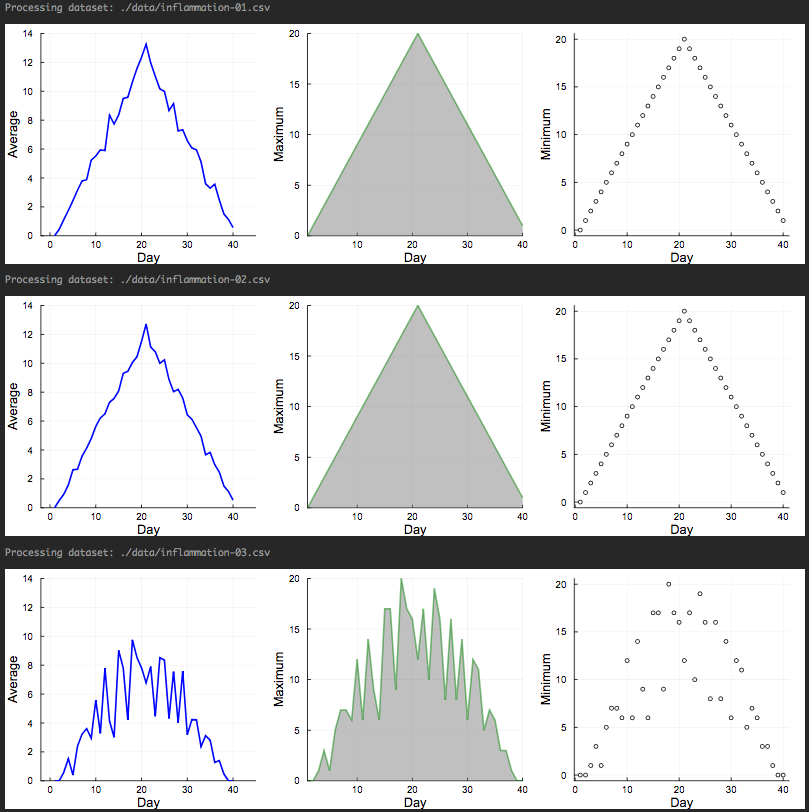
So let’s try now to apply everything we know to analyse the first 3 datasets and do it as it should be for a new script. Here is the list of commands in the following script:
filenames = sort(glob(“infl*”,”./data/”), rev=false); days=1:40;
for f in filenames[1:3]
println("Processing dataset: ",f)

sleep(0.5)

data = readdlm(f, ',');

p1=plot(days,mean(data,1)', ylabel="Average", label="Mean", color="blue", xlims=(-2,45), ylims=(0,14))
p2=plot(days,maximum(data,1)', ylabel="Maximum", label="Max", c="green",alpha=0.5, fill=(0,"gray"))
p3=plot(days,maximum(data,1)', seriestype=:scatter, ylabel="Minimum", label="Min", marker=(:white,2,:o,stroke(1,:black)))

p=plot(p1,p2,p3,layout=(1,3), legend=false, xlabel="Day", lw=2,size=(1000,300), grid=true)
display(p) end ```